In April 2026, Andrej Karpathy, a founding member of OpenAI, published a short note. He calls it an “idea file”: not a product but a pattern you hand to an AI agent to build. The idea is a wiki that is maintained not by people but by a language model. Karpathy has research, learning notes or team knowledge in mind. The pattern translates well to project work.
What Karpathy proposes
Most AI assistants for your own documents search for matching passages with every question and build an answer from them. How that works is explained in RAG explained: your AI never read the handbook. Karpathy’s objection: the model rediscovers the knowledge from scratch on every question, and nothing accumulates.
His alternative has three layers:
- Sources: articles, minutes, data. The model reads them but never changes them.
- Wiki: summaries and pages on topics, people or concepts, linked to each other. The model writes these files.
- Rules file: it defines how the wiki is structured and how the model works, for example as
CLAUDE.mdorAGENTS.md.
On top of that come three operations. When a new source is added, the model summarises it and updates every affected page, often ten to fifteen at once according to Karpathy. For a question, it reads an index first, then the relevant pages, and answers with references. When tidying up, it looks for contradictions, outdated statements and pages without links.
Karpathy explains why this should work with one observation: wikis kept by people fall into neglect because the maintenance grows faster than the value. A language model does not tire of keeping things up to date. There is no study on this; it is his argument.
The pattern for a project
For a project, the sources are minutes, emails and quotes. The wiki holds what you want to know in a project anyway: status, decisions, open items and risks. These pages are not Karpathy’s; they are my application of his pattern.
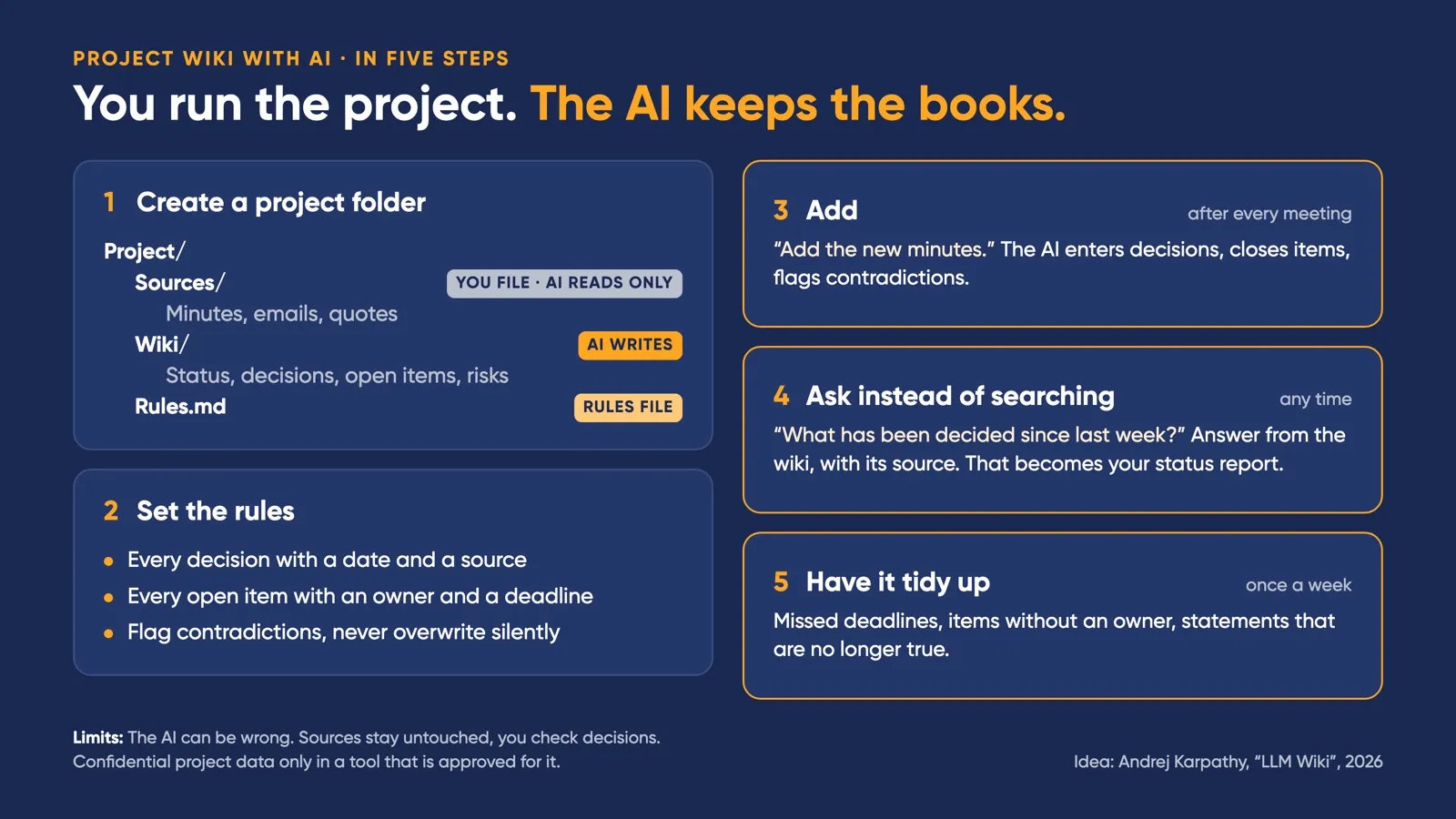
The rules file is the most important part. It turns a chatbot into a minute-taker that sticks to agreements. A start can look like this:
# Rules for this project wiki

- Never change files in Sources/.
- Every decision goes into Wiki/decisions.md, with a date and a source (file name of the minutes).
- Every open item goes into Wiki/open-items.md, with an owner and a deadline.
- If a new source contradicts the wiki: flag it and ask, never overwrite silently.
- Log every change with a date in Wiki/log.md.
Karpathy’s pattern also includes the change log (log.md). Later it shows when each source was added.
In daily work, three instructions are enough. After every meeting, the minutes go into the sources, and the instruction is: “Add the new minutes.” The model enters new decisions, closes finished items and tells you when something contradicts what was there before. Instead of searching, you ask: “What has been decided since last week?” or “Which items have no deadline?” The answer comes from the wiki and names its source, and it turns straight into your status report. Once a week, you have it tidy up: missed deadlines, items without an owner, statements that are no longer true.
What you need
A chat window you paste text into is not enough. You need an AI that is allowed to read and write files in a folder, in other words an agent. Karpathy mentions Claude Code and Codex. Any program that displays text files is enough for reading the wiki. Karpathy himself uses Obsidian.
Where the limits are
A language model can be wrong, including when it summarises minutes. That is why the sources stay untouched next to the wiki, and every entry points to its source. You check decisions yourself.
Project data is often confidential. It belongs only in a tool that is approved for it. How to judge that is shown in the data traffic light.
Size has a limit too. According to Karpathy, the index works well up to about a hundred sources. Beyond that, the wiki needs a search. For a single project, that is usually enough.
You run the project. The AI keeps the books. Checking stays your job.
Frequently asked questions
Do I need Obsidian for this?
No. The wiki consists of plain text files (Markdown) that any program can display. Karpathy uses Obsidian for reading because it shows links and connections well.
How many documents before the wiki needs a search?
According to Karpathy, the index is enough up to about a hundred sources. Beyond that, he recommends an additional search tool. For a single project, the index is usually enough.